

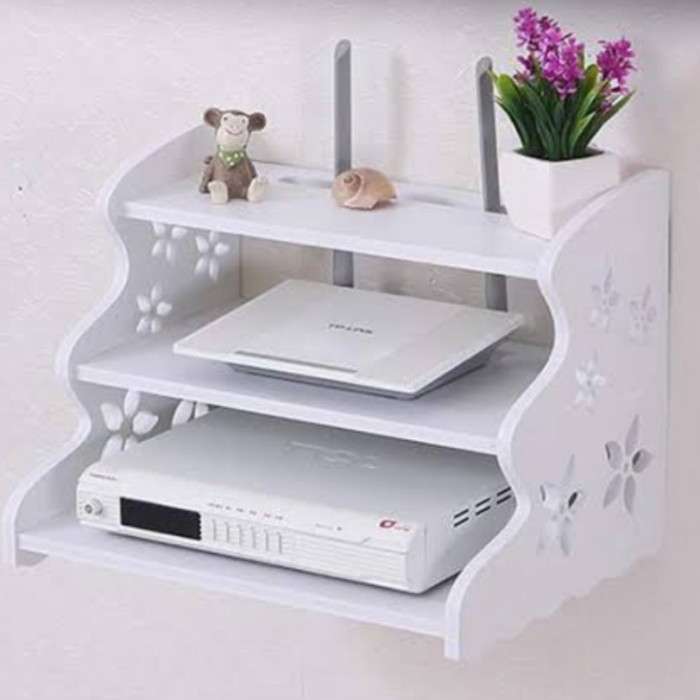
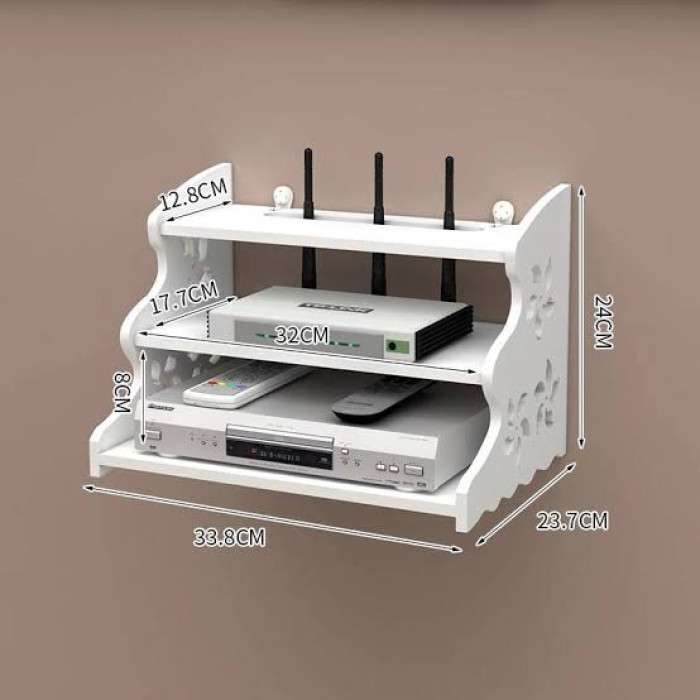





3 Layer Router Stand
Original price was: 990৳ .630৳ Current price is: 630৳ .
3 Layer Router Stand – Keep Your WiFi Router and Accessories Organized
A 3 Layer Router Stand is a practical solution for keeping your WiFi router and other compatible networking accessories organized in one convenient place. If your router, modem, cables, and small networking devices are scattered around your home or office, this three-layer stand can help create a cleaner and more organized setup. Its multi-level design offers useful storage space while helping you make better use of available room.
Whether you want to organize your internet connection setup at home, in your office, or in a small workspace, a WiFi Router Stand can make your networking area look more व्यवस्थित and professional.
Content Index
- What Is a 3 Layer Router Stand?
- Why Do You Need a WiFi Router Stand?
- Key Features of WiFi Router Stand 3 Layer
- Benefits of Using a 3 Layer Router Stand
- How Does a 3 Layer Wall Mount WiFi Router Stand Help?
- Where Can You Use a Router Stand 3 Layer?
- How to Choose the Right WiFi Router Stand
- Installation and Maintenance Tips
- Pros and Cons
- Frequently Asked Questions
What Is a 3 Layer Router Stand?
A 3 Layer Router Stand is a multi-level organizer designed to hold a WiFi router and other compatible networking accessories. Instead of placing every device on a table or leaving them scattered around, you can use its three separate levels to arrange your equipment more neatly.
The three-layer design provides additional organizing space without requiring multiple shelves. Depending on the product’s dimensions and weight capacity, it may accommodate a router, modem, network accessories, and other small devices.
A WiFi router is an important part of modern homes and offices. However, its accessories and connecting cables can make the surrounding area look messy. A dedicated router organizer helps solve this everyday problem.
For people who want a cleaner networking corner, a Router Stand 3 Layer is a useful home and office accessory.
Why Do You Need a WiFi Router Stand?
A WiFi router is often placed wherever a power socket or internet connection is available. As a result, it may end up on a crowded desk, near a television, or in an inconvenient corner.
Over time, the surrounding area can become cluttered with cables, adapters, modems, and other devices.
A WiFi Router Stand helps organize these items and makes the entire setup easier to manage.
Here are some common reasons to consider one:
1. Keep Your Networking Devices Organized
A three-layer organizer gives you separate spaces for arranging compatible devices and accessories. This makes it easier to identify and access the equipment you need.
2. Make Better Use of Available Space
If your desk or table has limited space, a multi-layer stand can help you organize devices vertically rather than spreading everything across one surface.
3. Create a Cleaner Home Environment
Loose cables and scattered electronic accessories can make a room look untidy. Organizing them in a dedicated place creates a cleaner appearance.
4. Improve Accessibility
Keeping networking equipment together makes it easier to access your router, modem, and related accessories when you need to check connections or make adjustments.
5. Suitable for Different Environments
A WiFi Router Stand can be useful in homes, offices, shops, study rooms, and other places where internet networking equipment is used.
Key Features of WiFi Router Stand 3 Layer
The main attraction of a WiFi Router Stand 3 Layer is its practical three-level storage design. It provides a simple way to arrange networking equipment while maintaining a more organized space.
Here are the key features to consider:
- Three-Layer Design: Offers multiple levels for organizing compatible networking devices and accessories.
- Space-Saving Organization: Helps make better use of available space.
- Neat Networking Setup: Keeps your router and related accessories together.
- Practical Storage Solution: Provides separate storage areas for different items.
- Home and Office Use: Suitable for organizing networking equipment in different environments.
- Easy Device Access: Helps keep commonly used networking equipment within reach.
- Organized Appearance: Reduces the appearance of clutter around your internet setup.
- Versatile Placement: Can be useful in different rooms and workspaces, depending on the installation design.
Note: Always check the actual product dimensions, material, installation method, and load capacity before purchasing.
Benefits of Using a 3 Layer Router Stand
Choosing a suitable 3 Layer Router Stand can offer several practical benefits beyond simply holding a router.
Organized Storage for Multiple Devices
Modern internet setups may include a WiFi router, optical network terminal (ONT), modem, adapters, and other accessories.
Instead of placing these items separately, a three-level stand gives you an organized storage arrangement. You can use the available levels according to your equipment size and weight requirements.
A Better-Looking Networking Corner
A clean and organized environment makes a positive difference in both homes and workplaces.
With a dedicated WiFi Router Stand, you can create a more professional-looking networking area without adding several separate storage units.
More Usable Desk Space
When networking devices occupy valuable table space, it becomes harder to keep your workspace organized.
A multi-level stand can help free up some usable surface area by arranging compatible equipment vertically.
Convenient for Everyday Use
You may occasionally need to restart your router, check indicator lights, reconnect a cable, or access an adapter.
Keeping the equipment together can make these everyday tasks more convenient.
Helpful for Small Homes and Offices
People with limited space often need practical storage solutions. A three-layer router organizer can help make a compact networking setup more manageable.
How Does a 3 Layer Wall Mount WiFi Router Stand Help?
A 3 Layer wall mount wifi router stand is a useful option for people who want to arrange networking equipment without occupying unnecessary floor or desk space.
A wall-mounted design uses vertical wall space to create a dedicated area for networking devices. This can be particularly helpful in small rooms, apartments, offices, and workstations.
Before installing a wall-mounted router stand, consider the following points:
- Choose a suitable wall location near the required internet and power connections.
- Check whether the stand is compatible with your router and other devices.
- Make sure the wall and mounting hardware can support the total weight.
- Keep enough space around the router for ventilation.
- Avoid placing the equipment in an enclosed or excessively hot location.
- Arrange cables carefully to prevent unnecessary pulling or bending.
Important: A wall-mounted stand does not automatically improve internet speed or WiFi coverage. Router performance depends on factors such as placement, surrounding obstacles, interference, and the router itself.
Where Can You Use a Router Stand 3 Layer?
One of the useful aspects of a Router Stand 3 Layer is its potential use in different environments.
Home
Keep your home internet equipment organized in a bedroom, living room, study room, or designated networking corner.
Office
Arrange networking accessories in an office environment where multiple electronic devices may be used.
Shop and Business Premises
A dedicated router organizer can help maintain a cleaner networking setup in retail shops, small businesses, and commercial spaces.
Study Room
If you use the internet for online classes, research, or computer work, an organized networking corner can make your study area more convenient.
Small Workspace
For compact workstations, a multi-layer organizer can help reduce clutter and make better use of available space.
How to Choose the Right WiFi Router Stand
Not every router stand is suitable for every networking setup. Before buying, consider the following factors.
1. Number of Storage Levels
If you have several networking accessories, a three-layer design may provide more organizing flexibility than a simple single-level holder.
2. Product Dimensions
Check the length, width, and height of each shelf. Make sure your router and other intended devices can fit comfortably.
3. Material and Build Quality
Look for a product with a sturdy construction and a finish suitable for regular household or office use.
4. Weight Capacity
Check the maximum supported load before placing multiple electronic devices on the stand. Never assume that every layer can support the same weight.
5. Installation Method
Some stands are designed for wall mounting, while others may use a different placement method. Choose one that matches your available space and installation requirements.
6. Ventilation
Routers generate heat during operation. Choose an arrangement that allows sufficient airflow around the device.
7. Cable Arrangement
Consider how the router’s power cable, internet cable, and other connections will be arranged. A neat cable setup can make the entire installation more convenient.
Installation and Maintenance Tips
Proper installation helps you get better use from your router organizer.
Follow these simple suggestions:
- Select a suitable location near your internet connection and power source.
- Check the product’s installation instructions before assembling it.
- Confirm that the mounting surface and hardware are suitable for the expected load.
- Place the router and accessories within their recommended weight limits.
- Leave adequate ventilation space around electronic devices.
- Arrange cables without stretching or tightly bending them.
- Clean the stand regularly to prevent dust accumulation.
For better WiFi performance, avoid placing your router inside enclosed cabinets or near major sources of electronic interference.
Pros and Cons of a 3 Layer Router Stand
Before purchasing a 3 Layer Router Stand, consider its advantages and limitations.
Pros
- Provides three levels of organizing space.
- Helps reduce clutter around networking equipment.
- Makes better use of available vertical space.
- Can help organize routers, modems, and compatible accessories.
- Suitable for different home and office environments.
- Makes networking equipment easier to locate.
- Can create a cleaner and more professional-looking setup.
Cons
- Requires suitable space for installation or placement.
- May not accommodate unusually large routers or accessories.
- Weight capacity depends on the actual product construction.
- Wall-mounted versions may require drilling and appropriate mounting hardware.
- Incorrect placement can restrict router ventilation.
Overall, a three-layer router organizer is a practical choice for people who want a more organized networking area. However, checking product compatibility and installation requirements is important.
Is a 3 Layer Router Stand Worth Buying?
If your router and networking accessories are taking up unnecessary space, a 3 Layer Router Stand can be a worthwhile organizational accessory.
Its main purpose is to provide a dedicated place for your networking equipment. The three-level arrangement helps you organize compatible devices, improve the appearance of your setup, and make better use of available space.
It is especially useful for people who have multiple networking accessories but want to keep everything in one organized location.
However, choose a stand based on its actual dimensions, construction, and load capacity rather than appearance alone.
For a cleaner home or office networking setup, a suitable WiFi Router Stand 3 Layer is a practical option.
Frequently Asked Questions (FAQs)
1. What is a 3 Layer Router Stand?
A 3 Layer Router Stand is a three-level organizer designed to hold a WiFi router and other compatible networking accessories. It helps keep electronic equipment arranged neatly while making better use of available space.
2. What is the benefit of using a WiFi Router Stand?
A WiFi Router Stand helps organize your router, modem, cables, and other networking accessories. It can reduce clutter, improve accessibility, and create a cleaner networking area at home or in the office.
3. Is a WiFi Router Stand 3 Layer suitable for home use?
Yes. A WiFi Router Stand 3 Layer can be useful in bedrooms, living rooms, study rooms, and other home spaces. It helps keep networking equipment together and organized.
4. Can I use a 3 Layer wall mount wifi router stand for multiple devices?
Yes, provided the individual devices fit the available shelf dimensions and remain within the stand’s weight capacity. Always check the product specifications before placing multiple devices on it.
5. Does a Router Stand 3 Layer improve WiFi speed?
No. A router stand does not directly increase internet speed. However, suitable router placement with sufficient ventilation and fewer physical obstacles may help support better wireless performance.
6. Can I keep a modem and WiFi router on the same stand?
Yes, if the stand has enough space and sufficient weight capacity. Make sure both devices have adequate ventilation and their cables can be connected safely.
7. Where can I buy a 3 Layer Router Stand in Bangladesh?
You can look for a 3 Layer Router Stand at online shopping stores, electronics accessory shops, and home organization product retailers in Bangladesh. Compare the product dimensions, build quality, installation requirements, and price before ordering.
Final Thoughts
Keeping your internet equipment organized does not have to be complicated. A 3 Layer Router Stand offers a practical way to arrange your WiFi router and compatible networking accessories in one convenient place.
Its multi-level design helps reduce clutter, makes better use of available space, and creates a cleaner home or office environment.
If you want a simple and practical solution for organizing your networking setup, consider adding a suitable three-layer WiFi router organizer to your space.
Make your networking corner cleaner, smarter, and more organized with a 3 Layer Router Stand.
Online Shopping in Bangladesh: (Click Here for Shop Now)
Discover More WiFi Router Stand :








Reviews
There are no reviews yet.